1. Multi-Tab Terminal Engine
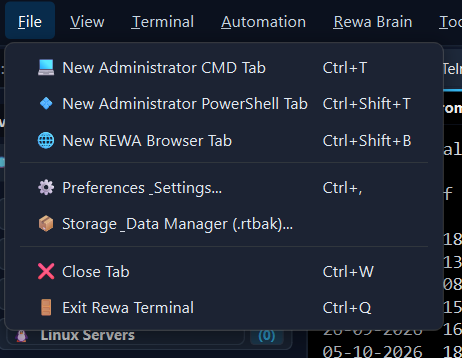
Unlike traditional terminals that clutter your screen with separate desktop windows, REWA Terminal integrates all local command shells, remote CLI devices, and web-based management consoles into a single, high-performance tabbed interface.
-
Native Elevated Shells: Start elevated Command Prompt or Windows PowerShell tabs without right-clicking or opening new UAC dialogues. Full access to
sfc,DISM, and service management. -
Integrated Web Management Tabs: Manage web-configured routers, firewalls, and switches side-by-side with your CLI sessions using the embedded WebEngine browser tab.
-
Keyboard Productivity: Use standard shortcuts like
Ctrl+T(New Tab),Ctrl+W(Close Tab), andCtrl+Tab(Cycle Tabs) for rapid workflow navigation.
2. Session Configuration & Protocol Profiles
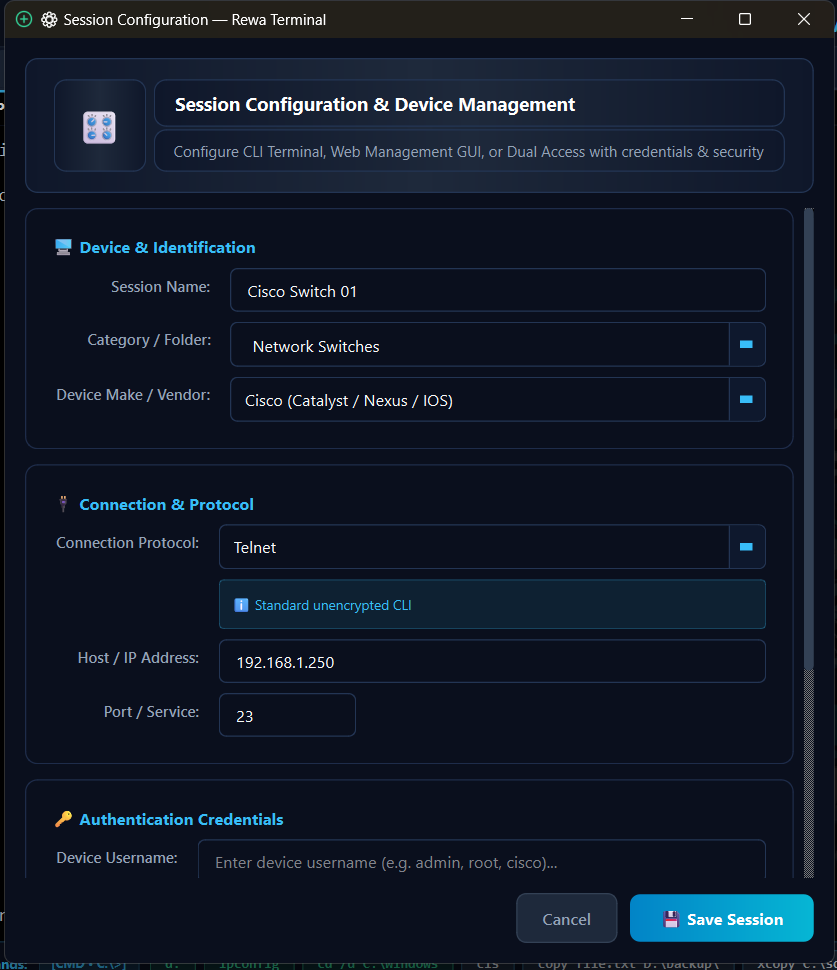
Configure, organize, and safeguard connections to routers, core switches, hypervisors, and physical appliances with granular connection parameters.
-
Supported Protocols: SSH (Secure Shell), Telnet, Local Command Shell, PowerShell, and Direct Web GUI management.
-
Hierarchical Grouping: Categorize your infrastructure by data centers, office branches, rack floors, or vendor types (Cisco, Juniper, MikroTik, Linux, Windows).
-
Credential Vault: Store device usernames, passwords, and private key passphrases locally with strong client-side encryption.
3. Real-Time Auto-Save Logging Engine
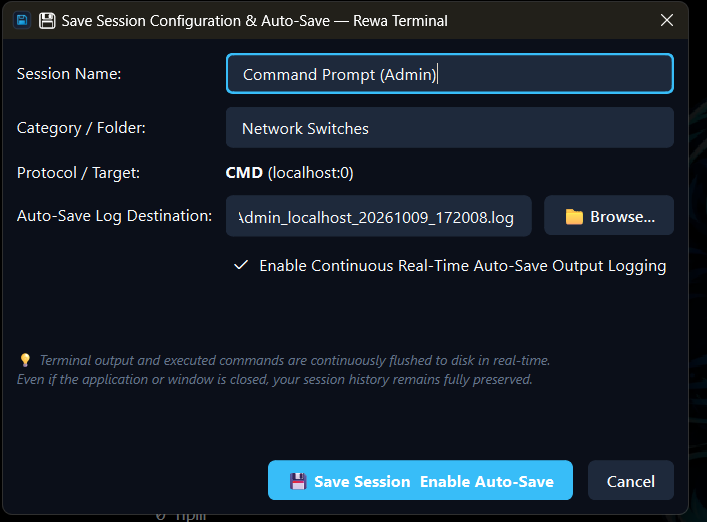
Network engineers frequently lose critical terminal outputs during unexpected system crashes, VPN disconnects, or sudden laptop battery exhaustion. REWA Terminal solves this permanently with active buffer streaming.
-
Zero-Loss Live Flushing: Output is written directly to clean disk log files (
Sessions/*.log) line-by-line as commands execute, not just when closing the app. -
Unrestricted Visibility: Logs are stored in human-readable plain text format right in the local application directory for instant access via Notepad or File Explorer.
-
Audit Trails: Timestamps and session parameters are automatically stamped onto the header and footer of every session log file.
4. Universal Session Migration
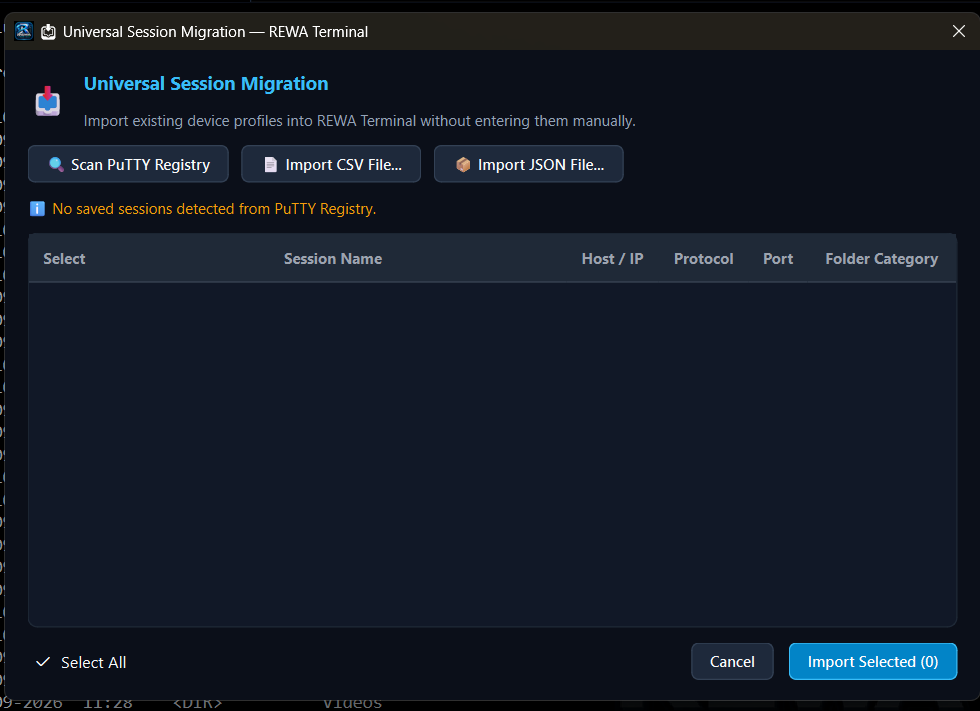
Switching terminal software shouldn't mean re-typing hundreds of device hostnames, IP addresses, and port numbers. REWA Terminal provides an automated migration assistant.
-
1-Click Registry Scanner: Automatically discovers legacy terminal registry keys on your computer and converts all saved sessions into REWA Terminal profiles instantly.
-
Bulk CSV & JSON Import: Import large inventory spreadsheets exported from network monitoring systems, CMDBs, or Excel sheets without manual data entry.
-
Export & Share: Share standard session packages with team members or deploy them across enterprise workstations.
5. Session History & Notepad Highlight Bookmarks
Review past maintenance windows, inspect device outputs, and quickly find highlighted errors with structured analysis tools.
-
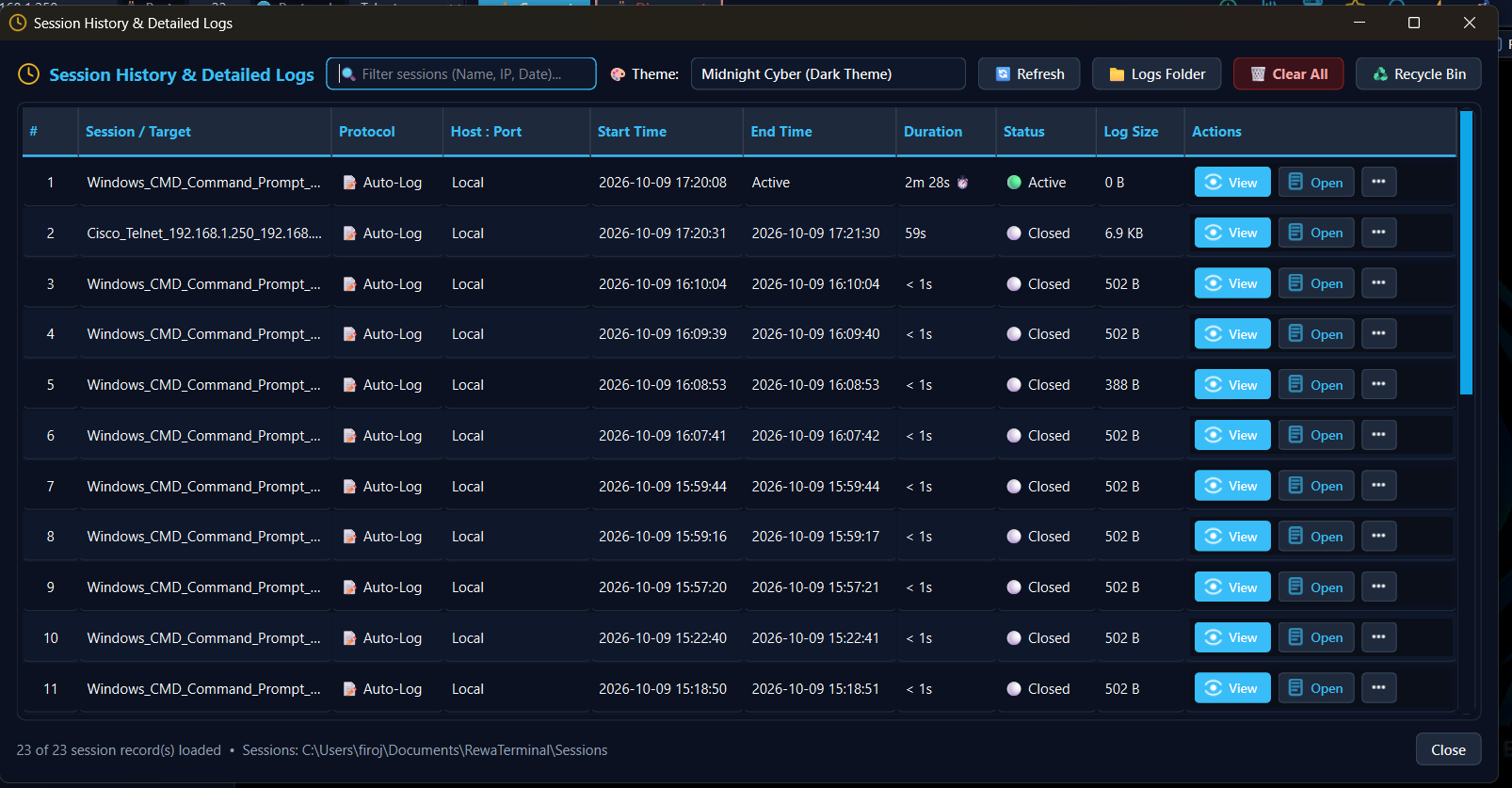
Comprehensive Audit Table: View historical session records with connection timestamps, elapsed duration, remote host IP, and total log size in KB.
-
Smart Highlight Exporter: Lines highlighted during your session (errors, warnings, IP addresses) are compiled into a top bookmark index and marked with
[★ HIGHLIGHTED]indicators when opened in Notepad. -
Search & Filter: Instantly filter session records by host name, date range, or protocol type.
6. Device Notes & Rack Hardware Metadata
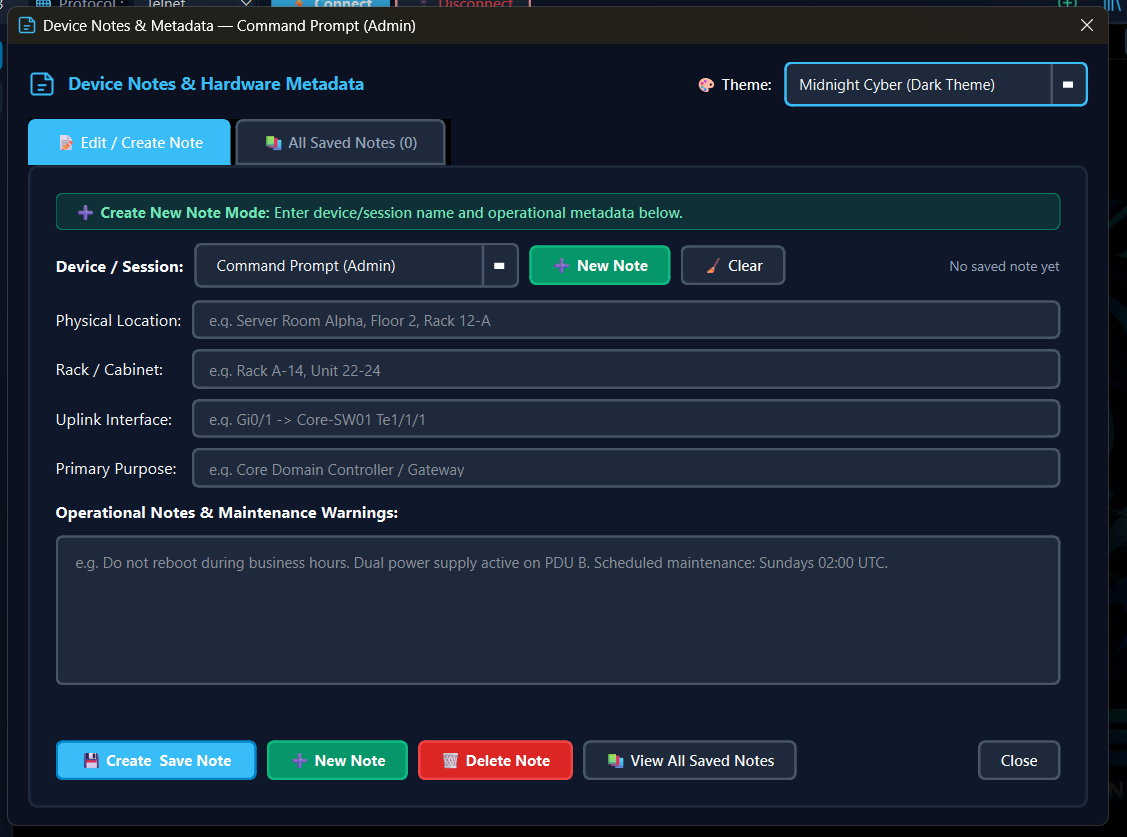
Keep track of physical data center details directly within the terminal interface so you never forget where a device is physically located or how it is wired.
-
Physical Location Fields: Store Room, Rack Number, Unit (U-height), and Datacenter facility tags.
-
Interface & Uplink Notes: Document primary fiber links, upstream gateway ports, and VLAN mappings.
-
Maintenance Warning Banners: Add emergency notices (e.g., "Do not reboot during business hours") that display when connecting.
7. Encrypted Safe Vault (.rtbak) & Replication
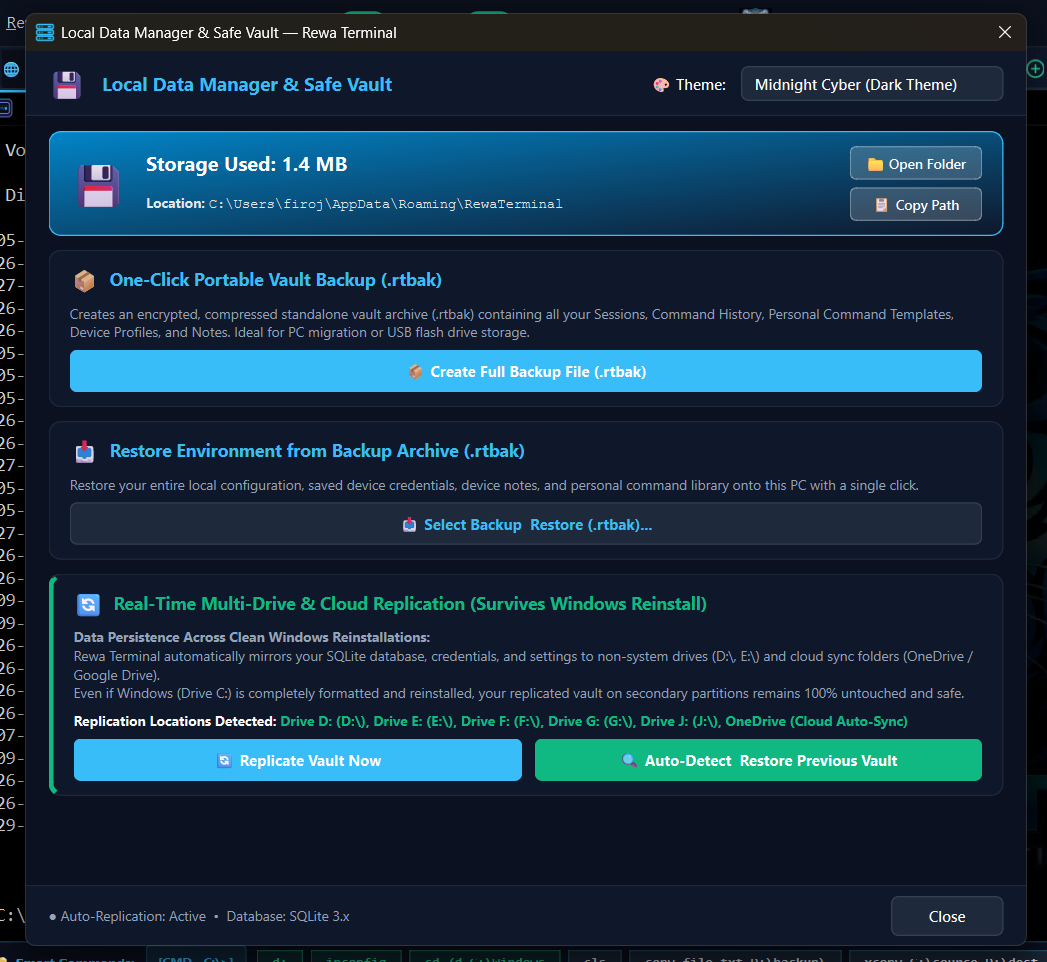
Ensure your configuration profiles, scripts, and device catalogs survive hardware failures, disk corruption, or complete Windows reinstalls.
-
AES Encrypted Vault: Back up all sessions, credentials, and settings into a single password-protected
.rtbakfile. -
Multi-Drive Auto-Replication: Automatically mirror your backup file to secondary internal drives (e.g.,
D:\Backups), external USB drives, or OneDrive sync folders. -
1-Click Restore: Restore your entire terminal configuration onto a brand new machine in under 5 seconds.
8. Modern Themes & Terminal Personalization
Work comfortably during long network change windows with professionally tuned visual themes and high-contrast typography.
-
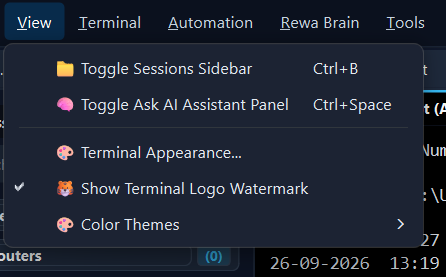
Light & Dark Modern Themes: Switch between clean, crisp daytime light mode and sleek Midnight Cyber dark mode based on your environment.
-
Custom Font Sizing & Typography: Fully customizable monospaced fonts (JetBrains Mono, Consolas, Cascadia Code) with instant Ctrl+MouseWheel zooming.
-
Subtle Watermark Emblem: Elegant white tiger watermark branding embedded into the console canvas for an unmistakable professional aesthetic.
Ready to Experience REWA Terminal?
Download the latest production build and upgrade your daily network engineering workflow.
🏠 Download Available on Home Page